
Showing a dashboard in another app
Show an Advanced Reports dashboard inside another HiScale app by its export key, with the dashboard's own permissions.
Another HiScale app in the same NetSuite account can show an Advanced Reports dashboard inside its own page, for example a vendor dashboard inside the Demand Planning app. You keep the dashboard in one place, Advanced Reports, and the other app shows it as it is today. This article is for the two people who set that up: the author who owns the dashboard and whoever builds the other app.
The link
The other app shows the dashboard in a frame, at the Advanced Reports address followed by #/e/d/ and the dashboard's export key:
/app/site/hosting/scriptlet.nl?script=123&deploy=1#/e/d/fbb6687e2a3bba6b49982dadd8c8cd4e
- The export key is the same in every account that imported the dashboard, so the other app needs one key for all of them.
- A dashboard gets its key when it is created. One built before version 1.10.0 and never exported gets it the next time you choose Save dashboard or Save in its Settings, or export it. Changing its audience from the Dashboards list does not give it a key.
- The Advanced Reports address differs between accounts. The other app looks it up on the server, from the script
customscript_hss_ar_sl, and never has it typed in. #/d/k/and the key, in place of#/e/d/, opens the same dashboard in Advanced Reports itself. Use it for an "Open in Advanced Reports" link.
Find the link
- Open the dashboard, click the gear icon and choose Edit dashboard.
- Choose Settings….
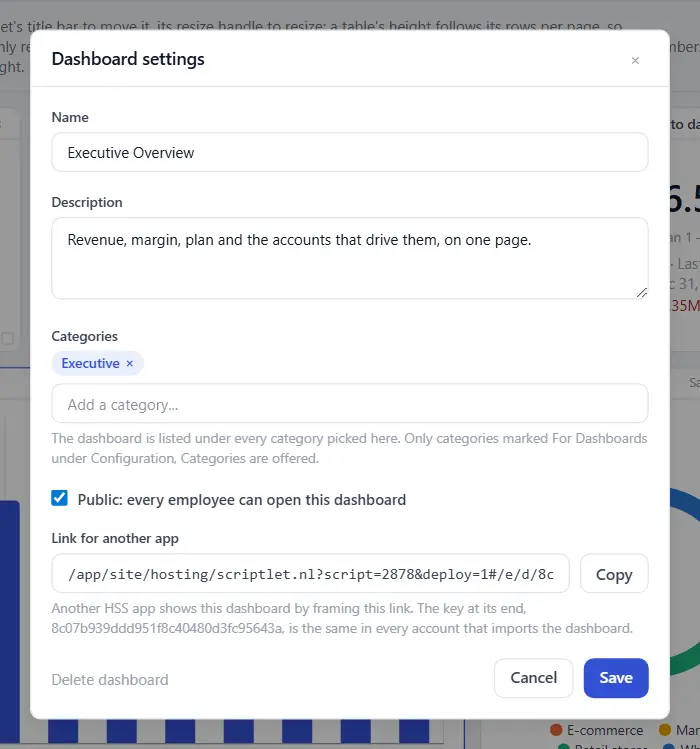
- Under Link for another app, choose Copy. The link is this account's, with the key at its end.
What the viewer sees
The dashboard's title, its filter bar, every widget, and three icon buttons at the top right: Refresh dashboard, Present and the gear. There is no sidebar and no top bar. The gear opens Print this page and Numbers. Nobody can change the layout from there.
- Refresh dashboard works as on the dashboard page. It rebuilds the reports the viewer can open and shows the progress in the frame. See Building a dashboard.
- A widget's report link, a drill-through and a click on a bar, a slice, a point, a table line or a stat tile's number open Advanced Reports in a new tab, with the dashboard's filters carried. The other app's page stays where it is.
- Print this page, in the gear menu, prints the dashboard alone on portrait paper, with the filters in effect. A framed dashboard has no Download as PDF and no choice of paper. Printing has been tried in Chrome and Edge. Safari and Firefox have not been tried yet.
- The gear menu opens inside the frame. In a frame shorter than the menu, the menu scrolls. Opening it does not change the height the frame reports to the other app.
Who can see it
The same people as in Advanced Reports.
- The dashboard's audience decides who can open it, and each widget follows its own report's audience.
- Someone outside the audience reads "This dashboard is not available" in the frame.
- Advanced Reports gives the same answer when no dashboard in the account has that key, so the frame never tells someone that a dashboard they cannot open exists.
- An Advanced Reports administrator sees every dashboard.
Opening on chosen filter values
?sf= after the key sets the filters the dashboard opens with, in the form a dashboard already uses to carry its filters to a report: a list of the filter, its type and its value, URL-encoded.
#/e/d/fbb6687e2a3bba6b49982dadd8c8cd4e?sf=[{"id":"f-vendor","kind":"select","value":{"op":"any_of","values":["GRAINGER"]}}]
id is the filter's id from the dashboard's export file, or its label. kind has to match the filter's type. A dropdown value has to match the report cell exactly as the report shows it. Anything that does not match is ignored and the dashboard opens on its own starting values. The viewer can change every filter afterwards. ?sf= works on the dashboard page in Advanced Reports too.
gb= sets the dashboard's Group by when the dashboard has one. The values are year, quarter, month and week, for example #/e/d/fbb6687e2a3bba6b49982dadd8c8cd4e?gb=quarter. Join it to sf= with &. Without it, the dashboard opens on the value its author saved. Any other value is ignored. The viewer can change it afterwards, and gb= works on the dashboard page in Advanced Reports too.
p= opens the dashboard on one of its pages, by the page's id, such as p=p2. The id is the one the address shows in Advanced Reports when that tab is open. present=1 opens the dashboard in present mode, one page at a time over the whole frame, and the viewer leaves it with Esc or Exit. For example #/e/d/fbb6687e2a3bba6b49982dadd8c8cd4e?present=1&p=p2. Full screen needs the frame to allow it: give the frame allow="fullscreen". Without it, present mode fills the frame. See Sections, pages and present mode.
For the app that frames it
- Frame the link from the same NetSuite domain. The frame only talks to a page on its own domain.
- The frame's outermost element carries
data-ar-embed-state, one ofloading,ready,not-foundorerror.readymeans every widget is drawn. - On every change of state, and whenever its content changes height, the frame posts
{ source: "hss-ar", type: "embed-state", state, exportKey, title, height }to the parent window. Check the message's origin andsourcebefore you use it. Size the frame toheight, or give it a fixed height and let it scroll. ?host=with a short name for your app writes that name to the Advanced Reports execution log next to the key, which helps trace where an open came from.
If something looks wrong
| What you see | Why, and what to do |
|---|---|
| "This dashboard is not available" | The viewer is outside the dashboard's audience, or no dashboard in this account has that key. |
| Link for another app shows no key | The dashboard was built before version 1.10.0 and never saved since. Choose Save in its Settings. |
A filter value in ?sf= is ignored | Its id or kind does not match the filter, or a dropdown value is not written exactly as the report shows it. |
| The other app gets no message from the frame | The link is framed from another domain. The frame only talks to a page on its own NetSuite domain. |
Related: Building a dashboard · Dashboard filters · Import and export · Categories, audience and rights